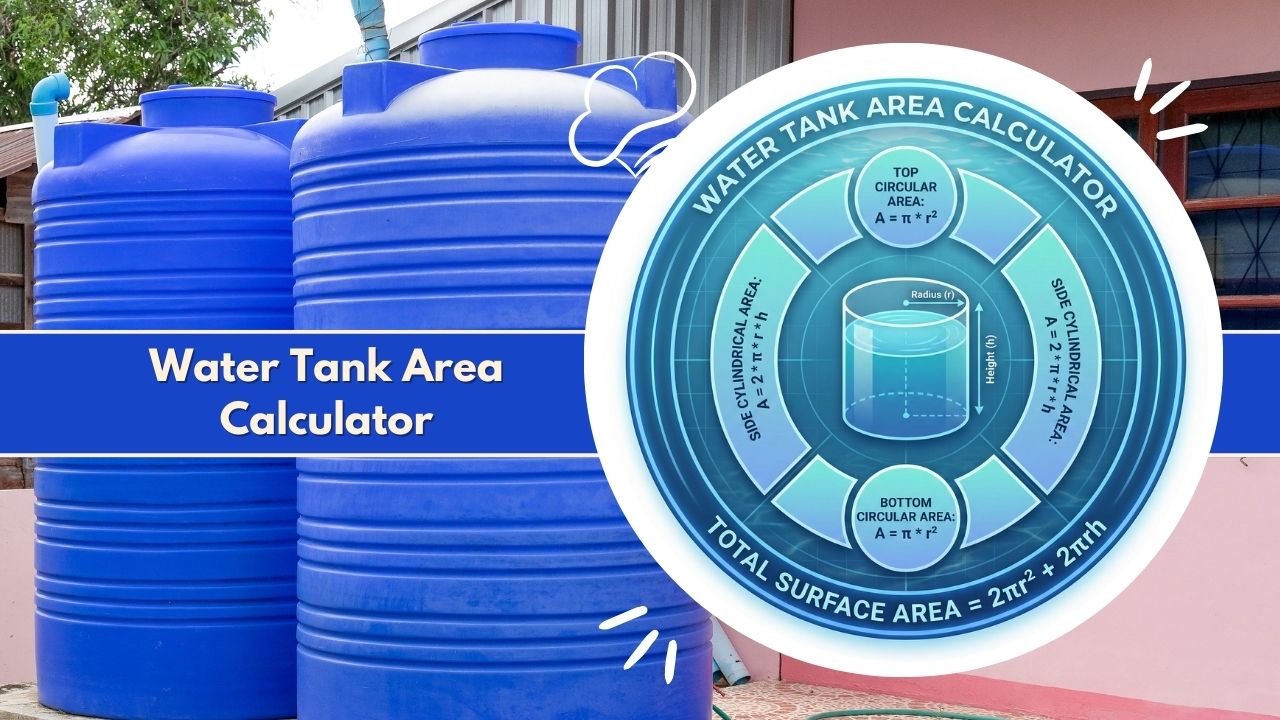
Calculate total surface area and volume with the Water Tank Area Calculator. Accurate results for cylindrical, rectangular, and custom tanks for painting, lining, and capacity planning.
Tank Configuration
Capacity Analysis
Detailed Breakdown
- Water Height (Actual) 0 m
- External Surface Area 0 m²
- Estimated Concrete Volume (15cm wall) 0 m³
Introduction to the Water Tank Area Calculator
Proper water storage is a fundamental requirement for residential, agricultural, and industrial projects. Whether you are installing a rainwater harvesting system, constructing a concrete reservoir, or lining an industrial chemical vessel, knowing the exact dimensions is crucial. The Water Tank Area Calculator is a specialized tool designed to determine two critical metrics: the total surface area of the tank’s material and its internal fluid capacity.
Many people confuse volume with surface area, but they serve very different purposes. Volume determines how much liquid the tank can hold, which is essential for usage planning. Surface area, however, determines how much material is needed to build, coat, or line the tank. The Water Tank Area Calculator simplifies these complex geometric computations, allowing users to input basic dimensions and receive precise data instantly. This guide provides a comprehensive overview of how this calculator works, the formulas behind it, and why accurate tank measurement is vital for cost-efficiency and safety.
Why Water Tank Surface Area & Capacity Matter
Understanding the physical properties of a storage tank goes beyond simple curiosity. The data provided by a Water Tank Area Calculator directly impacts the budget and structural integrity of a project.
- Material Estimation: If you are building a steel or concrete tank, you need to know the total surface area (walls, floor, and roof) to purchase the correct amount of raw materials.
- Protective Coatings: Tanks often require waterproofing, anti-rust paint, or food-grade epoxy linings. These are sold by coverage area (square meters or square feet). An accurate area calculation prevents overbuying expensive coatings or running out mid-job.
- Structural Load: Calculating capacity tells you the weight of the water. Since 1 cubic meter of water weighs 1,000 kilograms, knowing the total volume helps engineers design a foundation that will not crack or sink under the load.
- Usage Planning: For agriculture and irrigation, knowing the exact capacity ensures that the water supply matches the crop requirements for a specific duration.
Who Uses the Water Tank Area Calculator
This tool is versatile and serves a wide range of professionals and individuals:
- Civil Engineers & Architects: For designing reservoirs and ensuring structural safety standards.
- Construction Contractors: To estimate concrete, steel, and waterproofing materials accurately.
- Farmers & Agriculturalists: To plan irrigation reserves and fertilizer mixing tanks.
- Homeowners: For sizing rainwater collection barrels or septic tanks.
- Industrial Plant Managers: For managing chemical storage and maintenance schedules for large vertical silos.
What the Water Tank Area Calculator Is
The Water Tank Area Calculator is a digital utility that processes geometric parameters to output surface area and volume data. It acts as a bridge between raw measurements—such as height, diameter, width, and length—and actionable construction data. Unlike a standard volume calculator which only tells you how much space is inside, this calculator provides a holistic view of the tank’s physical shell.
Core Purpose of the Water Tank Area Calculator
The primary objective of the Water Tank Area Calculator is to eliminate manual calculation errors. Geometry involves constants like Pi (3.14159…) and complex multiplication that can easily lead to mistakes when done by hand. A decimal point error in a large industrial project could result in ordering tons of excess steel or insufficient waterproofing sealant. This tool automates the math, ensuring that the “Total Surface Area” includes all necessary faces—the vertical walls, the bottom base, and the top cover.
How the Calculator Simplifies Water Tank Geometry
Real-world tanks come in various shapes. The most common are cylinders (like oil drums or silos) and rectangular prisms (like underground concrete cisterns). The Water Tank Area Calculator standardizes the input method. Instead of forcing the user to derive the circumference from the diameter or calculate the area of a circle manually, the calculator asks for the simplest measurable dimensions. It then runs these inputs through pre-programmed algorithms to deliver immediate results for:
- Internal Volume: The cubic space available for liquid.
- Curved Surface Area: The outer or inner wall area (crucial for wrapping or painting).
- Top and Bottom Area: The flat circular or rectangular ends.
- Total Surface Area: The sum of all external or internal faces.
What the Water Tank Area Calculator Does
This tool functions as a multi-purpose engine for fluid storage analysis. It breaks down the tank into its geometric components to provide a detailed report.
Types of Tanks It Can Calculate (Cylindrical, Rectangular, Custom)
The Water Tank Area Calculator is programmed to handle the most prevalent tank geometries found in construction and industry:
- Vertical Cylinders: The standard shape for above-ground water tanks, silos, and rain barrels. The calculator accounts for the circular base and the wraparound height.
- Horizontal Cylinders: Often used for underground fuel or water storage. While the surface area math is similar to vertical cylinders, the volume calculation relative to liquid depth is more complex, which the calculator handles automatically.
- Rectangular & Square Tanks: Common for underground reservoirs, loft tanks, and swimming pools. The tool calculates the area of all six sides (front, back, left, right, top, bottom).
- Spherical Tanks: Sometimes used for high-pressure gas or specialized liquid storage, requiring specific radius-based formulas.
Accuracy, Output Format, and Capacity Details
When you input dimensions into the Water Tank Area Calculator, the output is typically provided in dual formats. Volume is generally expressed in cubic meters (m³) or cubic feet (ft³) and then converted into liquid capacity units like Liters or Gallons (US/UK). Surface area is provided in square meters (m²) or square feet (sq ft).
High-quality calculators will also distinguish between “Wetted Surface Area” (the area touched by water at a specific fill level) and “Total Geometric Surface Area” (the entire internal shell). This distinction is vital for projects involving partial linings or repairs.
Key Features of the Water Tank Area Calculator
Modern calculators are designed with user experience and precision in mind. Here are the defining features that make the Water Tank Area Calculator an indispensable tool.
Input Options for Dimensions & Geometry
Flexibility is key. The calculator allows users to input dimensions in various units, including millimeters, centimeters, meters, inches, and feet. It automatically standardizes these units internally before processing the calculation. This feature prevents conversion errors, such as a user accidentally multiplying meters by feet. The interface typically adapts based on the shape selected; for example, selecting “Cylinder” will prompt for Radius/Diameter and Height, whereas selecting “Rectangle” will prompt for Length, Width, and Height.
Calculation Capabilities for Area & Volume
The tool simultaneously computes two distinct sets of data:
- Area Calculation: It sums the areas of all constituent faces. For a cylinder, this is the sum of the top circle, bottom circle, and the rectangle that forms the curved wall when unrolled.
- Volume Calculation: It determines the three-dimensional space occupied by the tank.
This dual capability allows a user to answer two questions at once: “How much water can I store?” and “How much paint do I need to cover the outside?”
User-Friendly Interface for Fast Tank Estimates
The Water Tank Area Calculator is designed for speed. It utilizes clear labels, dropdown menus for shape selection, and instant computation buttons. Visual aids or diagrams often accompany the inputs to ensure the user understands which dimension is the “height” and which is the “length,” particularly for horizontal tanks. The results are displayed clearly, often separating the “Total Area” from the “Wall Area” to give a granular breakdown of the tank’s geometry.
Mathematical Formulas Used in the Water Tank Area Calculator
To understand how the Water Tank Area Calculator generates its results, it is helpful to look at the underlying mathematics. The calculator uses standard geometric formulas to ensure precision. Note that in these formulas, pi represents the constant approximately equal to 3.14159.
Surface Area Formula for Cylindrical Tanks
For a standard vertical cylinder (like a common garden water tank), the total surface area is composed of two circles (top and bottom) and one rectangle (the curved side wall unrolled).
- Top/Bottom Area:
Area = pi * radius * radius - Side (Lateral) Area:
Area = 2 * pi * radius * height - Total Surface Area:
Total Area = (2 * pi * radius * radius) + (2 * pi * radius * height)
Alternatively, using diameter: Total Area = (pi * diameter * diameter / 2) + (pi * diameter * height)
Surface Area Formula for Rectangular Tanks
Rectangular tanks are simpler but require calculating three pairs of opposing sides.
- Top/Bottom Area:
Area = Length * Width - Front/Back Area:
Area = Length * Height - Left/Right Area:
Area = Width * Height - Total Surface Area:
Total Area = 2 * ((Length * Width) + (Length * Height) + (Width * Height))
Volume and Capacity Calculations
Volume determines the storage capacity.
- Cylinder Volume:
Volume = pi * radius * radius * height - Rectangular Volume:
Volume = Length * Width * Height
To convert this volume into liquid capacity:
- 1 Cubic Meter = 1,000 Liters
- 1 Cubic Foot = approximately 7.48 US Gallons
The Water Tank Area Calculator performs these multiplications instantly after determining the cubic volume.
Variables Required for Accurate Tank Measurements
The accuracy of the output depends entirely on the quality of the inputs. The calculator relies on:
- Radius or Diameter: The distance from the center to the edge, or edge to edge passing through the center.
- Height: The vertical distance from the base to the top rim.
- Length/Width: For box tanks, the horizontal dimensions of the base.
Geometry Considerations for Water Storage Tanks
The calculator assumes “perfect” geometric shapes. However, real-world tanks may have rounded corners (fillets) or a conical roof. While the Water Tank Area Calculator provides a highly accurate baseline, users should add a safety margin (usually 5-10%) to their material estimates to account for these geometric variations, flanges, overlaps, and hardware protrusions.
How to Use the Water Tank Area Calculator Step-by-Step
Using the Water Tank Area Calculator is a straightforward process, but following a structured approach ensures the most accurate results.
Required Inputs for Tank Area & Volume
Before accessing the tool, gather the following data using a tape measure or architectural plans:
- Shape Type: Identify if the tank is a cylinder, rectangle, sphere, etc.
- Dimensions: Measure the internal dimensions if you need water capacity. Measure the external dimensions if you are calculating paint or insulation area.
- Units: Note whether your measurements are in meters, feet, or inches.
Step-by-Step Usage Flow
- Select Tank Shape: Choose the geometry that matches your tank (e.g., Vertical Cylinder).
- Enter Dimensions: Input the values into the corresponding fields. For a cylinder, enter the Radius (or Diameter) and Height.
- Select Unit: Ensure the dropdown menu matches your measurement unit (e.g., Meters).
- Click Calculate: Press the button to process the data.
- Review Results: Look at the “Total Surface Area” for material needs and “Total Volume” for storage capacity.
Expert Tips for Accurate Water Tank Results
- Measure Twice: Errors in measuring diameter can drastically affect the volume calculation because the radius is squared in the formula.
- Account for Wall Thickness: If calculating the volume of water (capacity), measure the inside of the tank. If calculating the surface area to paint the outside, measure the outside.
- Ignore Fittings: Do not try to subtract the area of pipes or manholes manually; it is better to calculate the full shape and treat the openings as negligible or as a buffer for material waste.
Water Tank Area Calculator Example Calculation
To illustrate the power of the Water Tank Area Calculator, let’s look at a practical example of a cylindrical farm tank.
Sample Tank Input Values
Imagine a farmer needs to line the inside of a concrete water tank and wants to know how much water it holds when full.
- Shape: Vertical Cylinder
- Diameter: 4 meters
- Height: 3 meters
- Unit: Meters
Detailed Step-by-Step Computation
When these values are entered into the Water Tank Area Calculator, the internal logic processes the following:
- Radius Calculation: Diameter / 2 = 2 meters.
- Base Area (Floor):
pi * 2 * 2= 12.57 square meters. - Top Area (Roof):
pi * 2 * 2= 12.57 square meters. - Side Wall Area:
2 * pi * 2 * 3= 37.70 square meters. - Total Surface Area: 12.57 (Base) + 12.57 (Top) + 37.70 (Side) = 62.84 square meters.
- Volume Calculation:
pi * 2 * 2 * 3= 37.70 cubic meters.
Interpretation of Surface Area & Capacity Output
- Lining Material Needed: The farmer needs to cover the floor and walls (assuming an open top). Area = Base (12.57) + Side (37.70) = 50.27 square meters of lining material.
- Water Capacity: 37.70 cubic meters converts to 37,700 Liters.
The calculator provides these final figures instantly, saving the user from performing multiple steps of manual math.
Practical Applications of the Water Tank Area Calculator
The utility of this tool spans across various industries, helping professionals optimize resources and ensure safety.
Construction & Water Storage Planning
In construction, the Water Tank Area Calculator is used to generate Bill of Quantities (BOQ). Contractors use the surface area to order formwork (shuttering) for concrete pouring and to estimate the quantity of reinforcing steel bars (rebar) required per square meter of wall.
Agricultural Water Systems
Farmers use the calculator to size tanks for irrigation and livestock. By calculating the volume, they can determine if a tank provides enough days of water autonomy during a drought. The surface area calculation helps in cost-estimating thermal insulation wraps to prevent freezing in winter or evaporation in summer.
Industrial & Commercial Tank Design
Chemical plants use the calculator to determine the surface area for specialized acid-resistant linings. An error here could lead to tank corrosion and failure. Furthermore, knowing the exact volume allows for precise mixing ratios in chemical processing tanks.
Residential Rainwater Harvesting & Storage
Homeowners use the Water Tank Area Calculator to determine if a tank fits in a specific corner of the garden and how much rainwater it can capture from the roof. It helps in selecting the right size tank—balancing physical footprint (Area) with required storage (Volume).
Advantages of Using a Water Tank Area Calculator
Transitioning from manual math to a digital calculator offers significant benefits.
Time Savings Compared to Manual Calculations
Calculating the total surface area of a complex tank manually takes time and requires verifying formulas. The Water Tank Area Calculator produces results in milliseconds, allowing engineers to test multiple “what-if” scenarios (e.g., “What if we make the tank 1 meter wider?”) instantly.
Reduced Errors in Tank Geometry Estimation
Human error is the biggest risk in calculation. Forgetting to multiply by 2, using the wrong value for Pi, or confusing radius with diameter are common mistakes. The calculator’s hard-coded logic prevents these arithmetic errors, ensuring a reliable baseline for decision-making.
Professional-Level Accuracy for Tank Sizing
The tool uses high-precision floating-point math, far more accurate than rough mental estimates. This precision is critical when dealing with expensive fluids or materials where a 5% variance represents a significant financial loss.
Common Mistakes When Using a Water Tank Area Calculator
Even with a perfect tool, user input errors can lead to incorrect results. Being aware of these pitfalls ensures better data.
Incorrect Dimension Inputs
The most frequent error is swapping dimensions. In a rectangular tank, swapping length and width affects the calculation of individual side panels, though the total volume remains the same. However, swapping height with radius in a cylinder calculation will result in drastically wrong volume and area figures.
Mixing Radius, Diameter, or Height Units
A user might measure the height in feet but the diameter in inches. If they enter “12” (thinking inches) into a field expecting feet, the Water Tank Area Calculator will calculate a tank that is 12 feet wide, not 12 inches. Always convert all measurements to the same unit before inputting, or use a calculator that has specific unit selectors for each dimension.
Forgetting to Include Top/Bottom Surface Area
When calculating paint or lining, users often forget to clarify if they need the Total Surface Area (closed tank) or just the Lateral Surface Area (open tank). The calculator usually provides the total; the user must subtract the top area if the tank is open-topped.
Limitations of a Water Tank Area Calculator
While powerful, the tool has boundaries regarding what it can physically model.
Assumes Standard Tank Shapes
The Water Tank Area Calculator is based on ideal geometric shapes. It does not automatically account for corrugations in steel tanks (which increase surface area), internal baffles, or sloped floors for drainage. For highly complex custom shapes, advanced 3D CAD software may be required.
Input Precision Limitations for Custom Tanks
If a tank is oval or has a tapered body (wider at top than bottom), a standard cylindrical calculator will only provide an approximation based on average diameter. Users with tapered tanks need to use specific “Frustum of a Cone” formulas, which some advanced versions of the calculator may support.
Accuracy Factors for Water Tank Area Calculations
The reliability of the output is a combination of tool precision and real-world variables.
Measurement Precision
Garbage in, garbage out. If the initial measurement is done with a loose tape measure or estimated by eye, the Water Tank Area Calculator result will be equally loose. Laser distance measurers are recommended for obtaining the exact dimensions of large tanks.
Shape Complexity & Irregular Surfaces
Old concrete tanks often bulge or have uneven walls. The calculator assumes perfectly straight walls. In these cases, it is best to take multiple measurements of the diameter at different heights and calculate using the average dimension.
Variation in Calculation Methods
Different calculators might use slightly different approximations for Pi (3.14 vs 3.14159). While this difference is negligible for a rain barrel, it can add up to a noticeable volume difference in massive municipal reservoirs. This specific calculator uses the high-precision standard.
Industry Standards Related to Water Tank Measurement
Professional tank calculation aligns with established engineering standards.
Construction & Material Standards
Organizations like the American Concrete Institute (ACI) or the American Petroleum Institute (API) have strict codes regarding tank wall thickness and surface area calculations for coating thickness. The Water Tank Area Calculator provides the raw geometric data necessary to comply with these codes.
Water Storage Safety & Compliance Guidelines
Safety guidelines often require tanks to have a certain “ullage” or freeboard (empty space at the top). When using the calculator for capacity, users should remember that the Total Volume is the brim-full capacity. Operational capacity is usually 90-95% of the calculated total volume to prevent overflow.
Troubleshooting Issues in Water Tank Area Calculations
If the results seem off, run through this checklist.
Unexpected or Unrealistic Outputs
If the result says the tank holds 1,000,000 liters but it looks like a backyard pool, check the decimal placement in your inputs. You likely entered millimeters as meters (e.g., entering 5000 meters instead of 5000 mm).
Missing or Invalid Tank Dimensions
If the Water Tank Area Calculator returns an error or zero, ensure no fields were left blank. A cylinder requires both radius and height; omitting one makes the calculation impossible.
Unit Mismatch & Conversion Errors
If you calculated volume in cubic feet but need gallons, ensure you are using the correct conversion factor. The calculator often handles this, but if doing manual conversions based on the calculator’s output, double-check your math.
Frequently Asked Questions About the Water Tank Area Calculator
Does the Water Tank Area Calculator calculate the weight of the empty tank?
No. The calculator determines the surface area and the volume of liquid inside. To find the weight of the empty tank, you would need to know the thickness of the walls and the density of the material (steel, concrete, plastic) and multiply that by the surface area calculated.
Can I use this calculator for diesel or chemical tanks?
Yes. The geometric volume is the same regardless of the liquid. However, if calculating weight, you must adjust for density. The calculator assumes water density (1 kg/liter). Diesel is lighter, and chemicals may be heavier.
How do I calculate the area for an open-top tank?
Calculate the “Total Surface Area” using the tool, and then subtract the area of the “Top” or “Lid.” Most outputs break down the area into Roof, Floor, and Walls to make this easy.
What is the difference between Usable Capacity and Total Volume?
Total Volume is the absolute maximum space inside the tank. Usable capacity is usually lower because the outlet pipe is rarely at the very bottom, and the overflow pipe is rarely at the very top.
Does the calculator account for wall thickness?
Generally, no. It assumes a zero-thickness geometric shape. For liquid volume, measure the internal dimensions. For exterior painting area, measure the external dimensions.
Why is the surface area important for water quality?
Surface area impacts the biofilm growth potential. A higher surface-area-to-volume ratio (like in flat, wide tanks) can lead to faster warming of water and more bacterial growth compared to tall, narrow tanks.
Can this calculate the volume of a horizontal cylinder?
Yes, provided the calculator has a “Horizontal Cylinder” mode. This is mathematically different from a vertical cylinder when calculating partial fill levels, though the total volume remains the same.
How accurate is the Water Tank Area Calculator?
The mathematical logic is 100% accurate based on standard geometry. The real-world accuracy depends entirely on the precision of the measurements you enter.
Can I calculate a square tank with this tool?
Yes, use the “Rectangular” option. A square tank is simply a rectangle where the Length and Width are equal.
How do I calculate the lining area for a pond?
Ponds usually have sloped sides. You can approximate it using the Rectangular option using the average length and width, but for precise liner ordering, add a 15-20% margin for overlap and slope variations.
What if my tank is oval?
Use the “Rectangular” tank option as a rough estimate, or use the “Cylinder” option using the average of the long and short diameters. For precise construction, specialized elliptical formulas are needed.
Does the calculator convert cubic meters to gallons?
Most advanced versions of the Water Tank Area Calculator include an automatic conversion feature that displays the result in Liters, US Gallons, and Imperial Gallons simultaneously.
How does determining surface area help with insulation?
If you need to keep water from freezing, you apply insulation to the exterior. The Surface Area result tells you exactly how many square meters of insulation roll to purchase.
Can I use this for calculating septic tank capacity?
Yes. Septic tanks are typically rectangular or cylindrical. The calculation for volume applies perfectly for sizing based on household occupancy.
Why do I need the radius if I have the diameter?
The formula uses radius. However, the calculator allows you to input the diameter, and it automatically divides it by 2 to find the radius for the calculation.
Related Tools & Calculators:
- Arch Pipe Area Calculator
- Partially Full Pipe Area Calculator
- Hollow Pipe Area Calculator
- Pipe Area Calculator
- Net Free Area Calculator
- Net Area Calculator
- Mulch Area Calculator
- Lawn Area Calculator
- L Shape Area Calculator
- Kitchen Area Calculator
- Kidney Pool Surface Area Calculator
- Kite Area Calculator